

About Netmix
...
...



|
Eras
2
|
|
News
2
|
|
World
3
|
|
Dance
6
|
|
Music
6
|
|
Talk
5
|
|
Childrens
2
|
|
Devotion
3
|
|
Other
6
|
|
African
1
|
|
Middle East
2
|
|
European
21
|
|
Asian
1
|
|
Indian
1
|
|
Unsorted
1
|
| Station Name | Shows | Genres | Current Show | Schedule | |
| WSOF Radio |
70
▾
|
10
| |||
|
Station Timezone: CST (GMT-06:00) - Chicago, America
|
|||||
| Electric Radio UK |
27
▾
|
15
| |||
|
Station Timezone: GMT (GMT+00:00) - London, Europe
|
|||||
| Ñanduti |
37
▾
|
1
| |||
|
Station Timezone: -03 (GMT-03:00) - Asuncion, America
|
|||||
| 70 Vibe FM |
14
▾
|
25
| |||
|
Station Timezone: SAST (GMT+02:00) - Johannesburg, Africa
|
|||||
| Radio Station Demo |
14
▾
|
7
| |||
|
Station Timezone: EST (GMT-05:00) - New York, America
|
|||||
| Christ Vision Media Network Internet Radio |
3
▾
|
4
| |||
|
Station Timezone: EST (GMT-05:00) - New York, America
|
|||||
| Shed FM UK |
24
▾
|
8
| |||
|
Station Timezone: GMT (GMT+00:00) - London, Europe
|
|||||
| Kiss FM Dance Music Australia |
113
▾
|
76
|
Anjunadeep
|
||
|
Station Timezone: AEDT (GMT+11:00) - Melbourne, Australia
|
|||||
| Undergrand Radio |
1
▾
|
||||
|
|
|||||
| Radio Lajeta.com |
3
▾
|
||||
|
|
|||||
| Radio Club California |
23
▾
|
||||
|
|
|||||
| Envol 91 |
22
▾
|
||||
|
|
|||||
| CHR Conquest Hospital Radio |
54
▾
|
||||
|
|
|||||
| Solid Rock Radio UK |
15
▾
|
||||
|
Station Timezone: GMT (GMT+00:00) - London, Europe
|
|||||
| Huntingdon Community Radio |
56
▾
|
||||
|
Station Timezone: GMT (GMT+00:00) - London, Europe
|
|||||
| Plan B 104.5 FM |
18
▾
|
||||
|
Station Timezone: GMT (GMT+00:00) - Accra, Africa
|
|||||
| Station Name | Shows | Genres | Current Show | Schedule | |
| Radio Christmas |
1
▾
|
||||
|
Station Timezone: GMT (GMT+00:00) - London, Europe
|
|||||
| Big FM Spain |
31
▾
|
||||
|
Station Timezone: CET (GMT+01:00) - Madrid, Europe
|
|||||
| Radio Sivar | |||||
|
|
|||||
| Chesterfield Radio | |||||
|
|
|||||
| Reckless Radio xyz | |||||
|
|
|||||

Radio Station by Netmix® is a WordPress plugin to build and manage a Show Schedule for a radio station or internet broadcaster’s WordPress website, including podcasters. It’s functionality is based on Drupal 6’s Station plugin, reworked for use in WordPress.
This is done by adding a new “Show” post type, schedulable blocks of time that contain a Show description, a Show shifts repeater field, assignable images and other meta information. You can also create Playlists associated with those shows, or assign standard blog posts to relate to a Show. It also supports adding Schedule Overrides for specific dates and times. The plugin has the ability to associate users (given a role of “Host” or “Producer”) to Shows, so they can be displayed for that Show and to give them edit access.
Latest Version is 2.3.0.4 (released August 27, 2021)
Full live examples are available on the
Radio Station Plugin Demo Site
Pro Upgrade is here!
/wp-content/plugins/ directory and unzip.Once you have installed and activated the Radio Station Plugin on your WordPress site, your WordPress Admin area will now have a new menu item titled Radio Station with submenu page items. If you are trying to do something specific, you can check out the FAQ for Frequently Asked Questions as you may find the answer there.
Firstly, you can visit the Plugin Settings screen to adjust the default Options to your liking. Here you can set your Radio Timezone and Streaming URL (if you have one) along with other global plugin settings. Also from this Settings page you may want to assign Pages and Views for your Program Schedule display and other optional Post Type Archive displays.
Add a New Show and assign it a Shift timeslot and Publish. Then check out how it displays on a single Show page by clicking the Show Permalink. Schedule Overrides work in a similar way but are for specific date and time blocks only. Depending on your Theme, you may wish to adjust the Templates used. You can also assign different Images to Shows (and Schedule Overrides.) Then have a look at your Program Schedule page to see the Show displayed there also. Just keep adding Shows until you have your Schedule filled in! You can further Manage your Shows and other Station data via the WordPress Admin area.
Next you may want to give some users on your site some plugin Roles. (Note that while the default interface in WordPress allows you to assign a single role to a user, it also supports multiple roles, but you need to add a plugin to get an interface for this.) Giving a Role of Host/DJ or Producer to a user will allow them to be assigned to a Show on the Show Edit Page and thus edit that particular Show also. You can also assign the Show Editor role if you have someone needs to edit all plugin records without being a site Administrator.
There are a few Widgets you can add via your Appearance -> Widgets menu. The main one will display the currently playing Show, and another will display Upcoming Shows. There is also a Current Playlist Widget for if you have created and assigned a Playlist to a Show.
Then there are also a number of other Shortcodes you can use in your pages with different display options you can use in various places on your site also. There is the Master Schedule, Widget Shortcodes, and also Archive Shortcodes for each of the different data records.
Radio Station has several in-built Data types. These include Custom Post Types for Shows, Schedule Overrides and Playlists. There are Taxonomies for Genres and Languages. You can override most data values and display output via custom Data Filters throughout the plugin. We have also incorporated an API in the plugin via REST and/or WordPress Feeds, and this data is accessible in JSON format.
This plugin is under active development and we are continuously working to enhance the Free version available on WordPress.Org, as well as creating new feature additions for Radio Station Pro. Check out the Roadmap if you are interested in seeing what is coming up next!
Read the Quickstart Guide for an introduction to the plugin, what features are available and how to set them up.
The latest documentation can be found online here. Documentation is also included with the currently installed version via the Radio Station Help menu item located under the Radio Station admin menu. You can find the Markdown-formatted files in the /docs folder of the GitHub Repository and in the /docs folder of the plugin directory.
For Radio Station customers using the free, open-source version of our plugin, you can contact us via our support channel in the WordPress support forums here. If you have any bug reports or feature suggestions please open an issue on our Github repository For Radio Station PRO subscribers, you can email us at [email protected] and someone will respond to your inquiry within 12 to 124 hours. All support inquiries will be handled in the order they are received. Before contacting support or opening an issue, make sure you check for conflicts by disabling all of your plugins and re-enabling them one at a time to ascertain which plugin is conflicting with Radio Station. Note that Radio Station PRO works as an addon to Radio Station, so deactivating it will disable the PRO features until you reactivate it.
Yes, you can trial Radio Station PRO for up to 14 days. You are required to set a credit or debit card when you sign up for the free trial and can cancel any time before the trial ends. The credit or debit card on file will be charged automatically once the trial expires 14 days from the date your free trial began. Click here to start your trial.
We have partnered with Freemius who provide an integrated subscription and upgrade system for WordPress plugin developers. When you purchase Radio Station PRO, you will receive email instructions to create your account, which contain a link to the Freemius User Dashboard here. While you can see your account details by navigating to WordPress Dashboard > Radio Station > Account, logging into the Freemius Dashboard will give you full control over your account.
We offer a 30 day, moneyback guarantee. If you are not satisfied with Radio Station PRO within the 30 day period, we will issue a full refund, no questions asked. Once the 30 day period is exhausted refunds are not available.
Login to your Freemius User Dashboard and navigate to Renewals & Billing to cancel your Radio Station PRO subscription. When you cancel your subscription, your account will stay active for the remainder of the billing period. Once your subscription is cancelled, you will lose access to PRO customer support and any future upgrades, bug fixes and feature additions. Radio Station (free) will continue to operate normally.
Simply create a new show via Add Show in the Radio Station plugin menu in the Admin area. You will be able to assign Shift timeslots to it on the Show edit page, as well as add the Show description and other meta fields, including Show images. In order to schedule a Show, a Show must be added and available to accept schedule entries. If this is your first time using Radio Station, create a new show via the Add Show item in the Radio Station menu in your WordPress Admin screen. You can assign Shift timeslots to your new Show or pre-existing Show on the Show edit page, as well as add a Show description and other meta fields, including Show images.
Navigate to the plugin Settings page via the Radio Station menu in your WordPress Admin screen and then click the Pages tab. There you can select the Page on which to automatically display the schedule, as well as which View to display (a Table grid by default.) Alternatively, you can use the shortcode [master-schedule] on any page (or post.) This option allows you to use additional shortcode attributes to control what is displayed in your Schedule (see Master Schedule Shortcode Docs )
If you have a one-off event that you need to show up in the Schedule and Widgets, you can create a Schedule Override by navigating to WordPress Dashboard > Radio Station > Schedule Overrides > Add New. This will allow you to set aside a block of time on a specific date, and when the Schedule or Widget is displaying that date, the override will be used instead of the normally scheduled Show. You can also link an Override to an existing Show, and partially update any Show information to be overridden. (Note that Schedule Overrides will not display in the old Legacy Table/Div Views of the Master Schedule.) In the Free version, if an Override needs to apply to multiple dates, you must schedule each time slot individually. In the PRO version, you can repeat the Override via day periods or monthly recurrences. To enable recurring overrides, Upgrade to Pro here
The schedule, widgets and show page will display whichever avatar is assigned to the show on the Show Edit screen. Navigate in the WordPress Dashboard to Radio Station -> Shows and locate the Show you want to add/edit the Avatar for in the Shows list. Edit the Show then simply set a new image for the Show.
The default styles for Radio Station have intentionally kept fairly minimal so as to be compatible with most themes, so you may wish to add your own CSS styles to suit your site's look and feel. You can add these styles via Theme Customizer's Additional CSS setting. You can also add your own rs-custom.css file to your Child Theme's directory, and Radio Station will automatically detect the presence of this file and enqueue it. Either way you can add more specific selectors with rules that modify or override the existing styles. You can find the base styles in the /css/ directory of the plugin.
The following Widgets are available to add via the WordPress Appearance -> Widgets page:
Since 2.5.0, these widgets are now also available as Gutenberg Blocks. See the Widget Documentation for more details on these Widgets.
In the free version of Radio Station, the Current Show, Upcoming Shows, and Current Playlist widgets can display a countdown, but do not refresh automatically. To enable auto-reloading of these widgets, so that they refresh exactly at a Show’s changeover time, upgrade to Radio Station PRO.
Current Show, Upcoming Shows and Current Playlist widgets do not refresh automatically in the Free version of Radio Station. This functionality is only available in our Pro version so widgets refresh exactly at a Show's changeover time. To enable s refresh exactly at Show changeover times. To enable auto-refresh widgets upgrade to Radio Station PRO
See the Shortcode Documentation for more details and a full list of possible Attributes for these Shortcodes:
[master-schedule] - Master Program Schedule Display[current-show] - Current Show Widget[upcoming-shows] - Upcoming Shows Widget[current-playlist] - Current Playlist Widget[shows-archive] - Archive List of Shows[genres-archive] - Archive List of Shows sorted by Genre[languages-archive] - Archive List of Shows sorted by Language[overrides-archive] - Archive List of Schedule overrides[playlists-archive] - Archive List of Show Playlists(Note old shortcode aliases will still work in current and future versions to prevent breakage.)
The free version of Radio Station includes support for classic Widgets and Gutenberg Blocks. The same widgets are available as modules for Elementor and Beaver Builder in the Pro version, along with additional styling options for each module. To enable these page builder modules, upgrade to PRO here.
You can to assign the Host or Producer roles to any WordPress User by accessing the User editor located under WordPress Dashboard -> Users. Search for or navigate to the User you want to assign as a Host or Producer, then click Edit to open the Edit screen for that User. Find the Roles dropdown menu and select from the Role options provided. Choosing either Host or Producer grants the User that role. You can then assign that User to single or multiple Shows via the Show Edit page. A Host or Producer only has permissions to Edit the Show(s) they are assigned to. The Pro version includes an additional Role Editor interface where you can assign the plugin Roles to any number of users at once. To enable the Role Editor interface, upgrade to PRO here.
There are a number of different options depending on what your goals are. Assigning a user as a Host or Producer to a Show will allow that User to edit it (and it's Playlists.) You could also assign a single User as the Author of a Show/Playlist. If you’d like to give a user that isn't a site Administrator permissions for all Radio Station records, you can assign them the Show Editor role that was created for this purpose. This may help keep clear lines of separation for editorial responsibility over your content. You can find more information on roles in the Roles Documentation.
If you prefer not to use WordPress-owned, Gravatar.com for your User profile images, you'll need to install a plugin that allows you to add a different image to your Host/Producer's user account. You can search for a free plugin in the WordPress plugin repository at WordPress.org. As there are a number of plugins that do this already, it's mostly out of the scope of this plugin. However, in our Pro version, you can create separate Profile pages to showcase each of your Hosts and Producers, to which you can assign profile images that appear on those. To enable Profile pages, upgrade to PRO here.
As of April 1st, 2023, known languages include the following:
You may translate the plugin into any other language supported by the WordPress translation engine. Please visit our Translate project page for all translations and for further instructions. Note that for ease of translation the Free version contains any extra text strings from the PRO version. The radio-station.pot file is located in the /languages directory of the plugin. If you do add a translation for your preferred language, please send or notify us of the completed translation to [email protected]. We'd love to include it.
Did you remember to check the "Active" checkbox for each Show? If a Show is not marked active, the plugin assumes that it's not currently in production and it is not shown on the Schedule. A Show will also not be shown if it has a Draft status or has no active Shifts assigned to it.
Try re-saving your site's permalink settings via Settings > Permalinks. WordPress sometimes gets confused with a new custom post type is added. Permalink rewrites are automatically flushed on plugin activation, so you can also just deactivate and reactivate the plugin to regenerate your site's permalinks.
Radio Station is stores your site's settings and all post type data in your WordPress MySQL database on your webhost. You can export your data using WordPress Dashboard -> Tools -> Export feature, or use Radio Station PRO’s Export feature located at WordPress Dashboard -> Import/Export. Our import/export feature works with YML and not XML, which is the standard WordPress format.
The only Hosts and Producers that may Edit a Show are the ones assigned as Host(s) or Producer(s) to that specific Show in the respective user selection menus. This is to prevent Hosts/Producers from editing other Shows managed by different Hosts/Producers without permission. If you need a user other than Administrator to be able to edit all Shows you can assign them a Show Editor role.
While the plugin is not specifically geared toward Podcasting, which is not live programming, some podcaster's have used Radio Station to let their subscribers know when they publish new shows.
Sure, there's no reason why you couldn't use the plugin to display a show schedule on a WordPress site for those services. Unfortunately, we are not currently syncing events from these platforms, but may do so in the future. While there may be APIs available from the larger services, Clubhouse does not yet have a public API, so scheduled rooms can't be automated to the Radio Station show scheduling system.
We haven't built an interface between Google Calendar and Radio Station just yet, but it's on our radar to do so in the foreseeable future.
We do not have a method of importing data directly from JOAN or Pro.Radio
If you are having issues with the plugin, we may recommend you install the development version for further bugfix testing, as it may contain fixes that are not yet released into the next stable WordPress version. It is recommended you do this on a staging site. Instructions:
develop branch of the Radio Station Github repository at:
https://github.com/netmix/radio-station/tree/develop//wp-content/plugins/radio-station-develop//wp-content/plugins/radio-station/ to /wp-content/plugins/radio-station-old//wp-content/plugins/radio-station-develop/ to /wp-content/plugins/radio-station/Then upload to WordPress via the plugin installer as normal. Note that it will install to /wp-content/plugins/radio-station-develop/, and because of this won't overwrite your existing installation, so you'll need to deactivate that before activating the development version.
You can now visit your site to make sure nothing is broken. If you experience issues you can reverse the folder renaming process to activate the old copy of the plugin. If the new development version works fine, at your convenience you can delete the /wp-content/plugins/radio-station-old/ directory.
Alternatively, if you want to do this from your WordPress Plugin area, you can upload the development Zip file from your Plugins -> Upload page. This will install it to /wp-content/plugins/radio-station-develop/. You can then deactivate the existing Radio Station plugin from you Plugins page and then activate the development version. (You can tell them apart on the plugins page via their version numbers. Official releases are 2.x.x, only development releases have the extra digit 2.x.x.x) Again, if you experience issues, you can deactivate the development version and reactivate the old version.
We are constantly improving and adding new features to Radio Station Pro. Periodically we will release a Beta version to test out a new feature (or fix) out before it is officially released. If you have a Pro license, you can access these cutting edge Pro Beta version releases in two ways:
Important Note: As we are developing the Free and Pro versions in tandem, the latest Pro Beta may require you to install a development version of the Free plugin for it to work. Please see the previous section for how you can install the development version from Github (if the required version is not yet available via the WordPress repository.)
We recommend you test these on a Staging site (or a development copy of your live site.) This way you can make sure there are no significant bugs before using it on a production site. Of course, please be willing to report any bugs that you do find so we can ensure they are not present in the next official release.
Since taking over the development of the free Radio Station plugin in June 2019, we've made massive improvements to every aspect of the project. Two years later, we released the Pro version and have continued to update and improve both versions, adding innovative features as we go.
The below table is a simplified overview to help keep track of all the major different features in Free and Pro, both those that we've added already and planned upcoming features. (If you want to contribute ideas or suggestions, please do so by opening a Github Issue.)
If you are interested in testing cutting edge features in development for this next release, read about Installing the Development Version and Pro Beta Version Testing.
For minor release notes, see the Radio Station Changelog
(Note: The Radio Station Pro changelog can be found in the plugin's readme.txt)
Normal = Feature Completed
italics = Upcoming Feature
bold = Next Major Feature(s)
| Free | Version | Pro | Version |
|---|---|---|---|
| SCHEDULE | |||
| Scheduler with Conflict Checker | 2.3.0 | with Visual Schedule Editor | 2.3.5 |
| Table, Tab and List Schedule Views | 2.2.8 | with Grid, Calendar and View Switching | 2.3.4 |
| Weekly Show Shifts and Date Overrides | 2.2.8 | with Recurring Periodic Overrides | 2.6.0 |
| CONTENT | |||
| Show Posts and Linked Overrides | 2.2.8 | with Show Episodes Post Type | 2.4.1 |
| Playlist with Track Editor | 2.2.8 | Show Episode Segment Editor | |
| Archive Shortcodes with Automatic Pages | 2.3.0 | with Episode and Team Archives | 2.4.1.8 |
| Show Page Display Template | 2.3.0 | with Social Icons | 2.3.5 |
| Show Hosts and Producers | 2.2.8 | with Profile Page Templates | 2.4.1 |
| PLAYER | |||
| Streaming Player Widget/Shortcode | 2.3.4 | with Sitewide Persistant Player Bar | 2.4.1 |
| Player Theme and Button Options | 2.3.4 | with Extra Skin and Color Options | 2.6.0 |
| File Playing Support and Buttons | with Playlist Track Support | ||
| WIDGETS/SHORTCODES | |||
| Radio Blocks (Gutenberg Block Editor) | 2.5.0 | Elementor and Beaver Builder Modules | 2.6.0 |
| Show Widget/Shortcodes with Countdowns | 2.2.8 | with Dynamic Reloading | 2.4.1 |
| Current Playlist Widget/Shortcode | 2.2.8 | Player Track Metadata Display | 2.4.1.3 |
| Radio Clock Widget/Shortcode | 2.3.2 | with User Timezone Switcher | 2.4.1 |
| EXTRAS | |||
| Host / Producer / Show Editor Roles | 2.3.0 | with Role Assignment Interface | 2.3.0 |
| REST/Feed API Endpoints | 2.3.0 | with Episodes, Hosts and Producers | 2.4.1 |
| Standard HTML Markup Output | 2.3.0 | with SEO Schema Markup | |
| Show Genre Assignments | 2.2.8 | Episode Guests and Topics | 2.4.1 |
Interested in going Pro? For a full feature list comparison, click here to find out more about Radio Station Pro.
If you are wanting to Submit a Bug or Feature Request, you can do so via the WordPress.Org Plugin Support Forum, but we would prefer you submit a more detailed issue via GitHub Issues where we track and prioritize these using GitHub Projects.
Similarly, you can Contribute directly to the plugin via submitting an Issue or Pull Request on the Github Plugin Repository. Or if you would prefer to get involved in the plugin’s development even more substantially, please Contact Us via Email and let us know what you would like to do.
All notable changes to this project will be documented in this file.
The format is based on Keep a Changelog, and this project adheres to Semantic Versioning.
= 2.5.17 = * Updated: Bump version number to fix release bug
= 2.5.16 = * Fixed: Player Block control color style preview / loading
= 2.5.15 = * Improved: AJAX player style output moved to footer * Option: Use Stream Player for latest Show file playback * Option: Use Stream Player for Episode file playback (Pro)
= 2.5.14 = * Fixed: Player resume (play/pause/play) glitch for Amplitude * Fixed: Keep active day when changing schedule weeks on Grid view * Fixed: Schedule Override list Override Date column display * Fixed: jPlayer change old fallback SWF path to empty string
= 2.5.13 = * Updated: Freemius SDK (2.12.0) * Fixed: load text domain too early notice * Fixed: added nonce checks to offer dismissals
= 2.5.12 = * Updated: Block translation and element functions * Fixed: preload player settings when Block editing
= 2.5.11 = * Added: AJAX load of Schedule views for cachebusting * Fixed: instance validation for schedule loader shortcode * Fixed: mismatched function name in popup player
= 2.5.10 = * Updated: Freemius SDK (2.11.0) * Updated: reader.php with prefixed reader functions * Updated: Plugin Panel (1.3.5) with new reader function * Updated: Color Picker Alpha Library (3.0.4) * Updated: Howler Library (2.2.4) * Improved: use wp_kses on player widget output * Improved: player volume slider background sync/hover * Fixed: Freemius optin image URL path
= 2.5.9 = * Fixed: Missing use of prepare method on some database queries * Added: Vulnerability disclosure program link to FAQ * Added: Edit Host/Producer link to admin Show List column
= 2.5.8 = * Fixed: Template display for themes showing excerpts on singular pages * Fixed: Possible next show duplicates current show in Data API * Fixed: Save multiple Show related post values * Fixed: Count bug on Override Archive shortcode * Fixed: Date/time display on Override Archive shortcode * Fixed: Show file Disable Download checkbox saving * Added: Use automatic Embeds on external Show file URLs * Added: Nonce check to notice dismissal AJAX * Changed: Removed player state saving iframe
= 2.5.7 = * Updated: Freemius SDK (2.6.0) * Disabled: Howler Player Script (browser compatibility issues) * Improved: Schedule Engine Weekdate calculations * Fixed: AJAX shortcode/widget loading for current time * Fixed: Widget title display duplication
= 2.5.6 = * Updated: Freemius SDK (2.5.11) * Updated: Plugin Panel (1.3.0) * Added: Filter for query and meta for show post list shortcode * Updated: Language translations file (.pot) * Updated: Bundled Dutch translation * Fixed: check linked override shifts before displaying * Fixed: hide empty widgets to work in AJAX loading mode * Fixed: remove direct usages of date function * Fixed: display of show posts on show page (query) * Fixed: Data API next_show data field * Fixed: minor schedule engine issues * Improved: more consistent sanitization and escaping
= 2.5.5 = * Updated: Freemius SDK (2.5.10) * Added: RSS Posts Feed: Related Show node * Added: RSS Show Feed: Host/Producer node * Fixed: Prefix Block element JS constant to prevent conflict (EventOn) * Fixed: RSS Posts Feed: filter by Show conflict
= 2.5.4 = * Updated: Freemius SDK (2.5.9) * Fixed: Missing player back-compat arguments
= 2.5.3 = * Fixed: Bug in Admin Override Timeslot List
= 2.5.2 = * Fixed: Bug retrieving show data for linked overrides
= 2.5.1 = * Fixed: Widget Countdown Timer Display Bug * Fixed: Pro Player Backwards Compatibility
= 2.5.0 = * Added: Radio Station Blocks! (converted Widgets) * Updated: Freemius SDK (2.5.7) * Updated: Plugin Panel (1.2.9) * Updated: AmplitudeJS (5.3.2) * Updated: Howler (2.2.3) * Updated: Moment JS (2.29.4) with WP Loading * Improved: Refactored Schedule Engine Class * Improved: Redesigned higher resolution player buttons * Improved: Standardized Widget Input Fields * Improved: WordPress Coding Standards * Improved: Sanitization using KSES * Improved: Translation Implementation * Improved: use WP JSON functions for data endpoints * Improved: Schedule Templates to use Classes and Instances * Improved: Tab Schedule default date display on * Improved: use wp_send_json for feed endpoints * Added: Freemius Pricing Page v2 * Added: assign Playlist to a specific Show Shift * Added: Quick Edit of Playlist to assign to Show * Added: Volume Control options to Player widget * Fixed: Countdowns with multiple widget instances * Fixed: Radio Player iOS no volume control detection * Fixed: Mobile detection (via any pointer type) * Fixed: Genre/Language Archive Pagination * Fixed: Adjacent Post Links (where show has one shift) * Fixed: Workaround Amplitude pause event not firing * Fixed: inline scripts when main script in head tag * Security Fix: Escape all debug output content
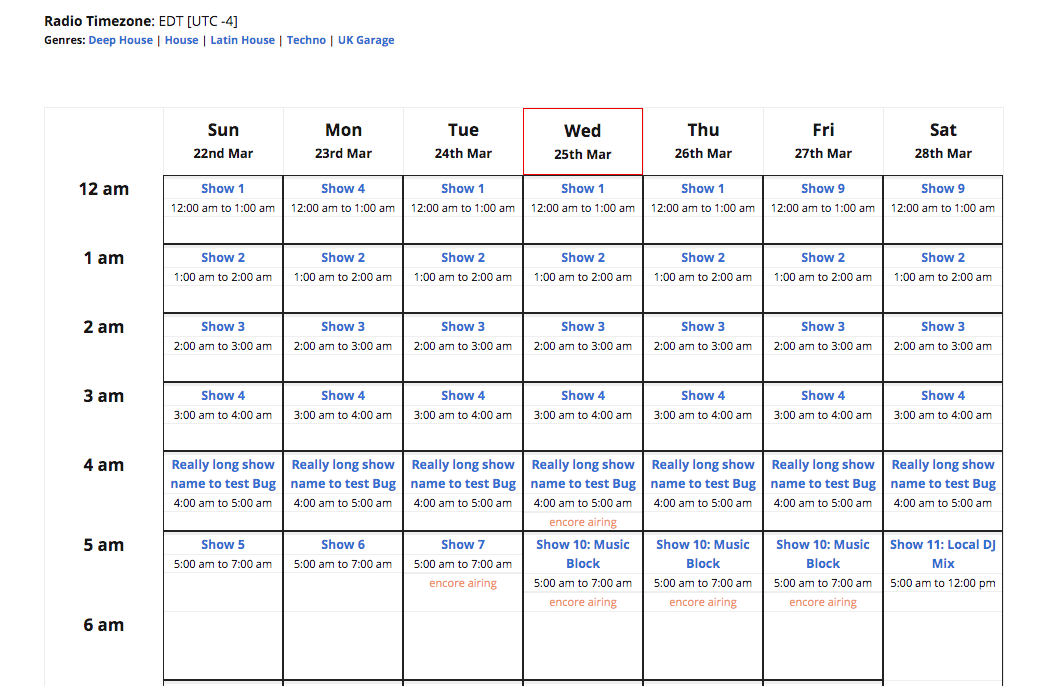
Schedule your weekly Show programme for display to your site visitors, with multiple Show Shift and date-specific Schedule Override support. A Responsive Grid Table view for your Schedule is available via the plugin settings or can be further customized using the schedule shortcode. Arrows allow access to other days of the week on narrower screens, giving both full and easy access to your schedule. Includes timezone display, 12 and 24 hour support. The currently playing show is highlighted and visitors can also highlight Shows by Genre selections.
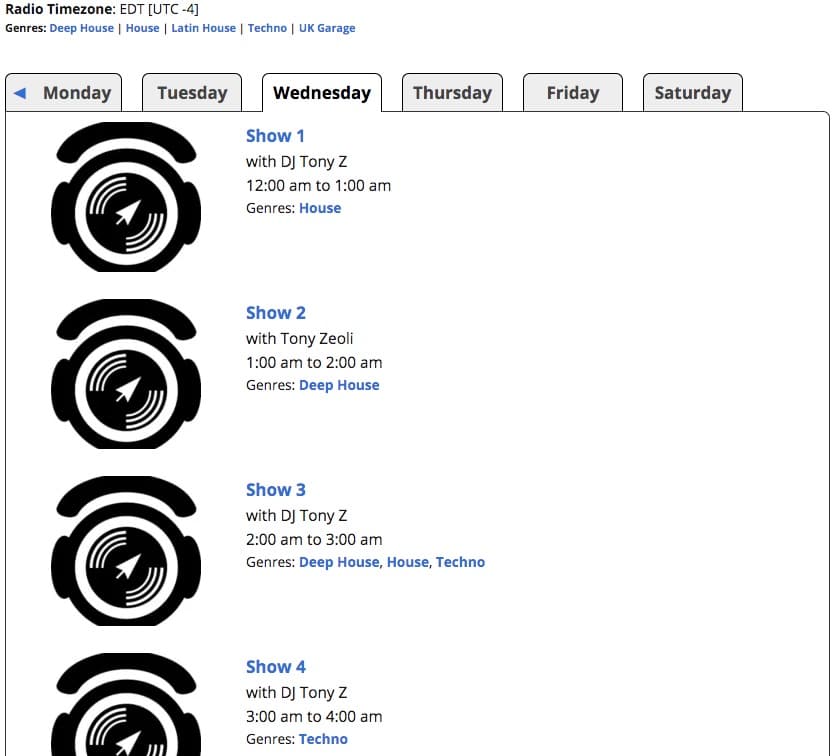
You can also display your Show Schedule in a Tabbed list view for each day of the week. Previously, this was only available by implementing some custom coding. Now, we’ve baked this view option into the plugin settings and schedule shortcode. And like the table view, it’s also width responsive, making it easier to scroll and toggle the days of the week on a mobile or other small screen device. And again visitors can also highlight Shows by Genre selections.
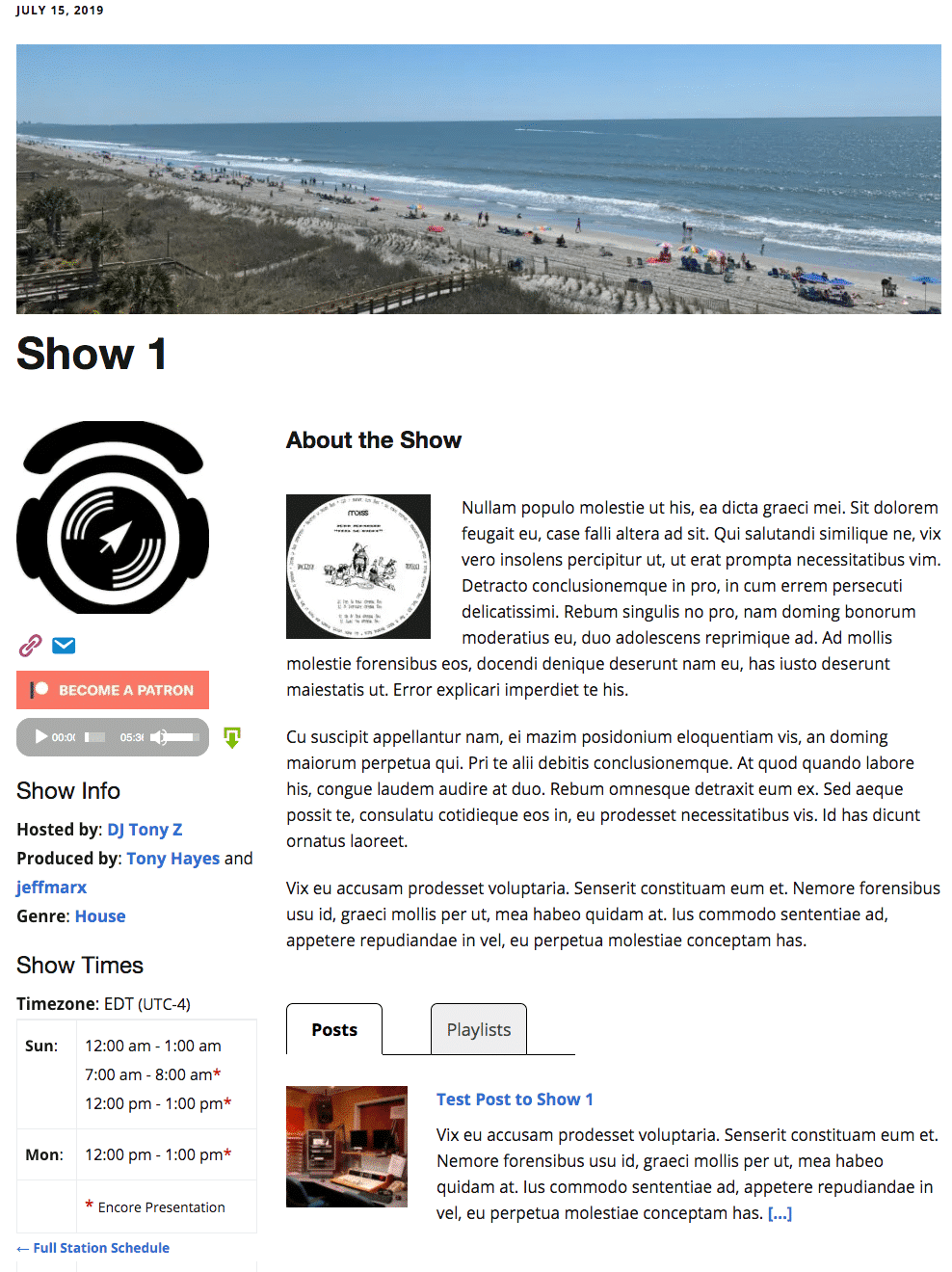
Since 2.3.0, we’ve created an entirely new Show Page layout complete with Featured Image, Show Avatar, Show Times, and Show Description with a clickable “more* feature that shows/hides long show descriptions to help prevent long scrolls. Show Blog Posts and Playlists are now available as pagination lists in tabs under the Show Description. Plus an embedded audio player for your latest Show broadcast and a new Patreon button to allow supporters to give to each Show.
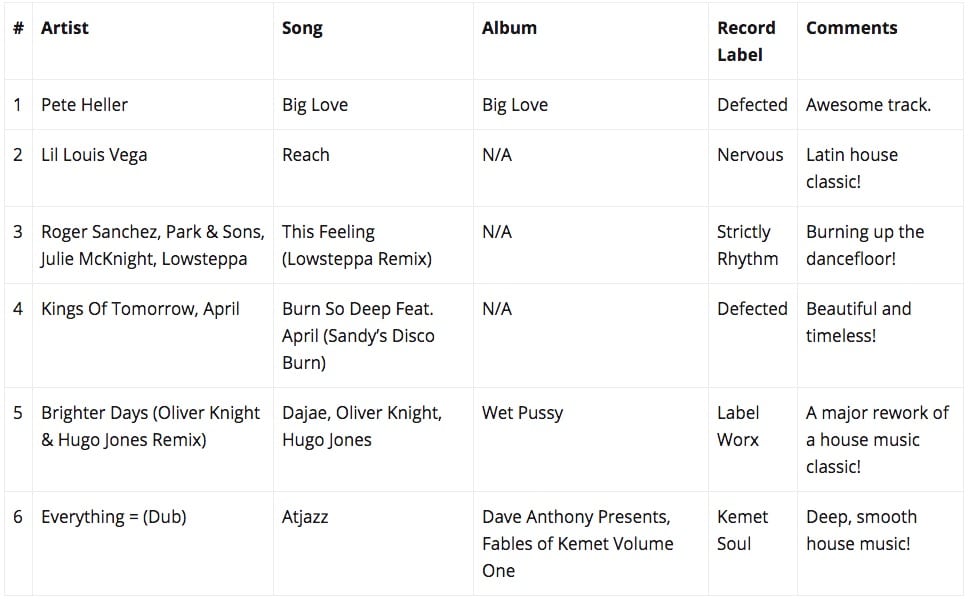
Create and attach Playlists to Shows, including Song Title, Artist, Album and Comments. Each Playlist has it’s own individual page and current Show playlist displays via a Current Playlist Widget. Set to Queue or Played to hide or display a Playlist entry.
A Current Show Widget is available with the plugin for showing your currently on-air Show, including options for which show details you wish to display there. Similarly, an Upcoming Shows Widget lists a number of shows that are scheduled to play next. Also included since 2.3.0 is a countdown timer option, displaying the remaining time for the Current Show and time to commencement for Upcoming Shows.
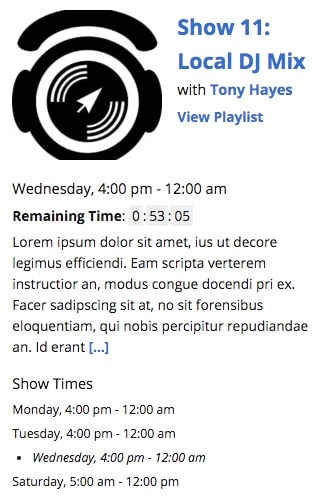

As well as supporting shortcodes for all the widgets, the plugin now includes archive list shortcodes for the all the plugin post types: Shows, Playlists and Overrides, as well as Shows by Genre. Extensive shortcode attributes are available so you can choose what to display or not. Additionally, Show-related archives shortcodes are available for listing Show Posts and Show Playlists.
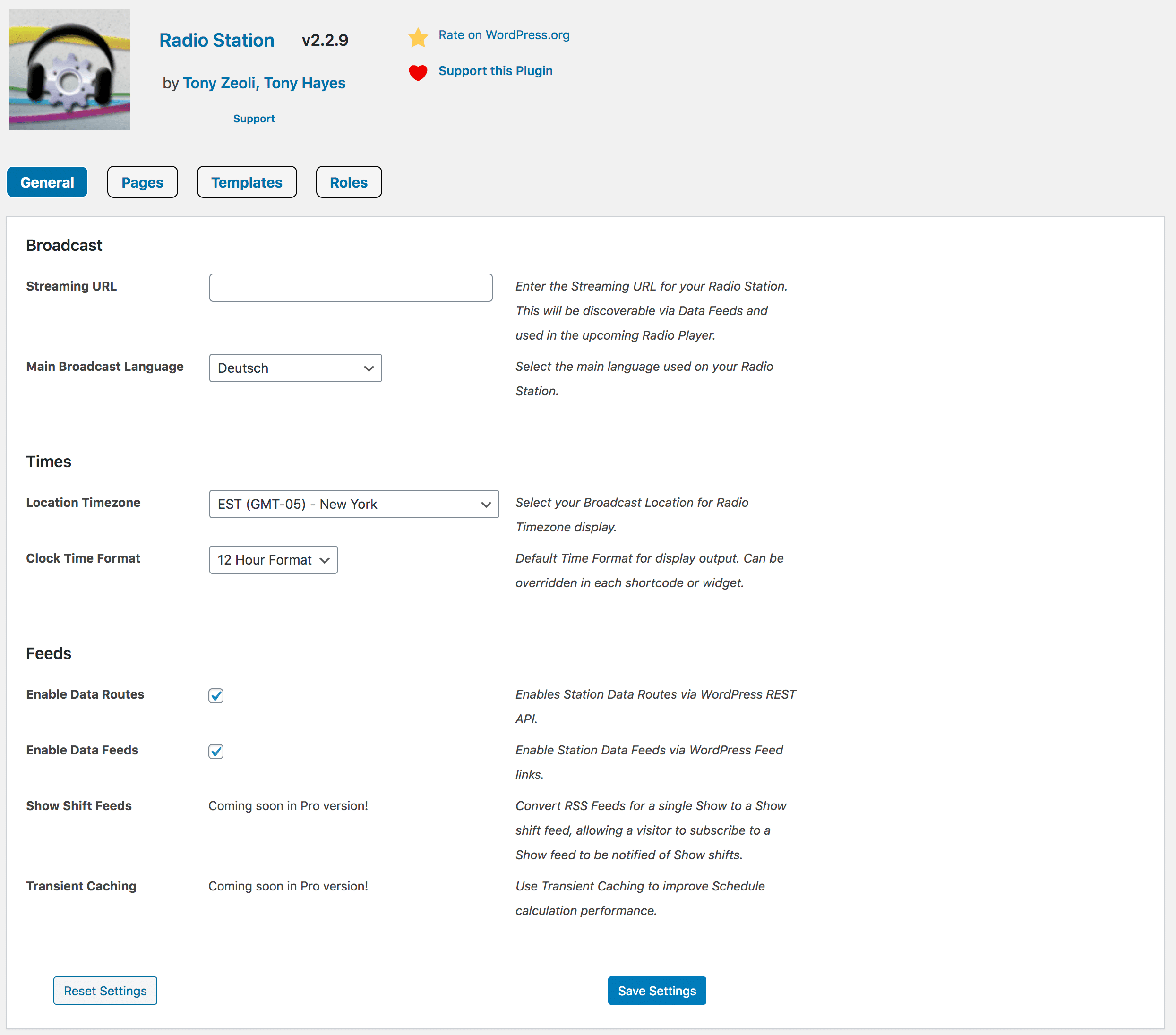
As of 2.3.0, you’ll find the new admin settings screen, where you can manage your Station settings. Set your Streaming URL, manage timezone by location and set 12 or 24-hour clock, select automatic display pages and other display options including templates, and set role permissions.
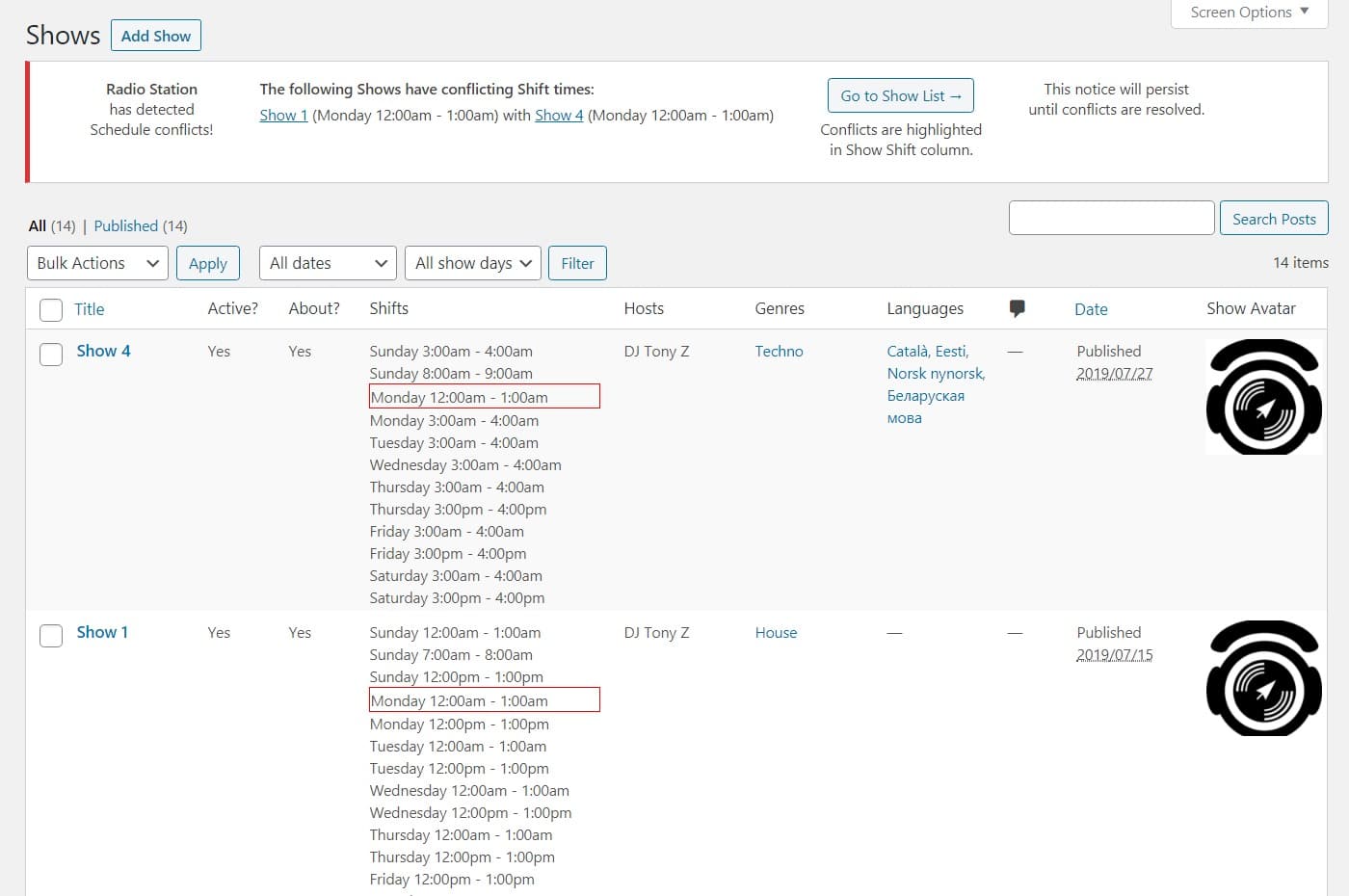
Catch and manage Show Shift Conflicts with our awesome Show Conflict Catcher. Displays existing conflicts in on the Show List page and in the Admin Notifications area. Newly added Show Shifts are checked against all other Show’s shifts when saved. Conflicting shifts are saved but disabled so you can fix shift conflicts.
Users given a Show Host role (eg. DJs) or Producer role can be assigned to a Show, giving them edit permissions and displaying them on the Show page and/or in widgets. And since 2.3.0, along with Producers, we’ve added an extra role for Show Program Editors so that site admins do not have to share their login credentials.
With an in-built Genre Taxonomy and newly added Language Taxonomy, you can assign Genres or Languages to a Show. This is a great bonus, allowing for easier discovery by your listeners of Shows in their favourite genres and native languages.
Using the WordPress REST API (and Feeds), all your Station and Show data is now portable, making integration with other external services a breeze. For example, you can now get listed in the Netmix Radio Station Directory and have your Station’s schedule and show data displayed there automatically!
Ready to get started?
Pro version under active development!